
Text-based video editing
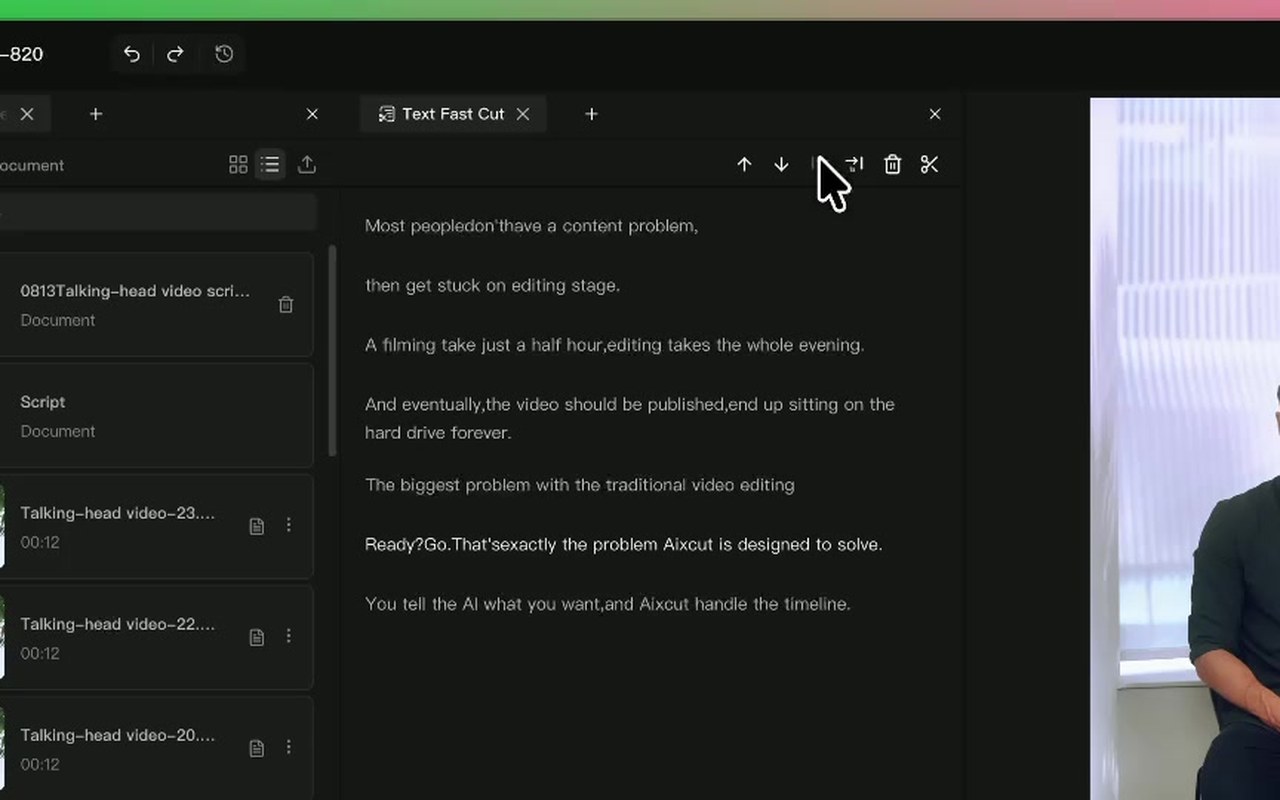
Organize talking-head recordings and interviews through the transcript. Follow the relationship between sentences and clips as you trim or rearrange the edit.
Where this capability fits
Locate repeated phrases, mistakes and tangents in the transcript, then check tone and expression in the footage before cutting.
Select a sentence and inspect the linked clip changes. After moving sections, review pronouns, transitions and context.
Use text to choose content, then refine cut boundaries on the timeline for breaths, pauses and visual continuity.
Start with a clear process
- 01
Generate and proofread the transcript, especially names and technical terms.
- 02
Mark passages to keep, remove or move, working one section at a time.
- 03
Play revised passages and joins, checking sound and captions.
Describe what you need
Use this as a starting point. Adapt the assets, audience and goal, then review the result.
Tighten repeated wording in this talking-head recording while preserving necessary conditions. Suggest cuts first and retain qualifiers such as cannot or not recommended.
Review before delivery
- Does the transcript match the speech?
- Do essential conditions remain after trimming?
- Do cut boundaries truncate words or create abrupt jumps?
Questions, answered
Is deleting a sentence enough?
Playback is still necessary. Text boundaries may not be ideal cut points, so review word endings, pauses and adjacent shots.
Which footage is a good fit?
Clear spoken recordings, interviews and lessons are a good fit. Music, ambient sound and action-led material often need direct timeline review.
Explore related workflows
Bring your footage. Start with a clear goal.
Apply the workflow to your own content, review each step and refine the finished video.